Troubleshooting
Symptom, cause and fix for the failures this migration actually produces, from WSL setup through replication and pushdown.
Find your symptom, read why it happens, apply the fix. The entries are grouped by where they surface: the Windows environment, the Postgres client tooling, Terraform and AWS, replication, and the ClickHouse leg. Several of these failures report success and then do nothing, which is the hardest class to debug from the symptom alone, so each one names the signal that distinguishes it.
Windows and WSL 2
wsl --install is unavailable or only prints help
- Symptom - Administrator PowerShell does not recognize
wsl --install, or it prints help instead of installing Ubuntu. - Why - Windows is below the workshop minimum, pending updates have not been applied, or corporate policy disables WSL.
- Fix - run Windows Update and confirm Windows 11 or Windows 10 version 2004 (build 19041) or later. Restart, then follow Microsoft's manual WSL installation steps. On a managed machine an administrator has to permit the required Windows features.
A command is "not recognized" in PowerShell
-
Symptom - PowerShell rejects
terraform,psql,aws,export,source, or any other command this workshop gives you. -
Why - PowerShell is used only for the explicitly labelled WSL bootstrap in module 00. Everything else runs inside Ubuntu on WSL 2, including Terraform and the AWS CLI, and the Windows
terraform.exeoraws.execannot see the Linux checkout or the Linux credentials file even when it is installed. -
Fix - open Ubuntu from the Start menu, return to the workshop directory, and run it there:
cd "$(git rev-parse --show-toplevel)/workshops/postgres_migration"
terraform -chdir=terraform version
Ubuntu is running as WSL 1
-
Symptom -
wsl --list --verboseshows Ubuntu withVERSION 1, or Docker Desktop cannot integrate with the distro. -
Why - the distro predates WSL 2 or was installed with WSL 1 as the machine default.
-
Fix - in PowerShell as Administrator, convert it and make 2 the default, then reopen Ubuntu:
wsl --set-version Ubuntu 2
wsl --set-default-version 2
wsl --list --verbose
The repository is under /mnt/c
-
Symptom -
pwdprints a path beginning/mnt/c/Users/...; Docker bind mounts are slow; scripts fail on permissions or line endings. -
Why - the clone landed on the Windows filesystem instead of WSL's Linux filesystem.
-
Fix - keep the old copy only if it holds uncommitted work. Otherwise clone again in your Linux home directory:
cd ~ git config --global core.autocrlf input git clone https://github.com/ClickHouse/ClickHouse_Demos.git cd ClickHouse_Demos cd "$(git rev-parse --show-toplevel)/workshops/postgres_migration" pwdpwdmust begin with/home/.
A script reports /usr/bin/env: 'bash\r': No such file or directory
-
Symptom -
scripts/preflight.shor another.shfile fails immediately, and the error containsbash\ror^M. -
Why - Windows CRLF line endings replaced the repository's required LF endings, so the interpreter name on the shebang line ends in a carriage return.
-
Fix - in Ubuntu, set Git's WSL policy and renormalize the checkout:
git config --global core.autocrlf input
git status --short
git add --renormalize .
Review
git statusbefore discarding anything. The same failure hits generated SQL edited by a Windows editor reached through\\wsl.localhost\Ubuntu\...: a trailing carriage return inside apsqlvariable becomes part of the value, so a host name silently fails to resolve. Edit files from inside Ubuntu.
docker is unavailable inside Ubuntu
- Symptom - Docker Desktop is running, but Ubuntu reports
docker: command not foundor cannot reach the daemon. - Why - Docker Desktop's WSL engine or its Ubuntu integration is off.
- Fix - enable Docker Desktop -> Settings -> General -> Use the WSL 2 based engine and
Settings -> Resources -> WSL Integration -> Ubuntu, apply, then run
wsl --shutdownin PowerShell and reopen Ubuntu.docker versionmust show both a Client and a Server section.
WSL has taken all the host memory, or Grafana cannot start
-
Symptom - the host is swapping,
vmmemorvmmemWSLholds several GB after the seed finishes, or Docker cannot start the Grafana container for lack of memory. -
Why - the WSL virtual machine grows to a large share of host RAM by default and does not hand pages back to Windows until it is restarted. Docker Desktop's WSL 2 backend inherits that same limit.
-
Fix - close Docker Desktop, then write a
.wslconfigin your Windows user profile that caps the virtual machine, and restart WSL:@('[wsl2]', 'memory=8GB', 'processors=4') | Set-Content -Encoding ascii "$env:USERPROFILE\.wslconfig" wsl --shutdownStart Docker Desktop, reopen Ubuntu, and re-check with
docker info --format 'Docker memory: {{.MemTotal}} bytes'. Reclaiming memory mid-workshop is safe for the writer and the harness, which reconnect, butwsl --shutdownkills the backgroundpsqlrunning the seed. Restart that from module 01 if the seed had not finished.
Postgres client tooling
pg_dump refuses with a server version mismatch
-
Symptom - module 03's schema-only dump stops with
pg_dump: error: server version: 17.x; pg_dump version: 16.xandpg_dump: error: aborting because of server version mismatch. -
Why -
pg_dumprefuses to dump from a server newer than itself. It does not fall back to an older format, and nothing earlier in the workshop makes the mismatch visible, which is why module 00 checkspg_dump --versionrather than onlypsql --version. -
Fix - install a client at or above the server's major version, then confirm the binary your shell actually resolves:
pg_dump --version
command -v pg_dump
psql -h "$RDS_HOST" -U shopadmin -d shop -Atc 'SHOW server_version'
On Ubuntu, pin the PGDG repository and install
postgresql-client-17as module 00 describes; apostgresql-clientfrom Ubuntu's own archive can be several majors behind. On macOS the usual cause is a versioned server formula such aspostgresql@14shadowing Homebrew'slibpq: runbrew unlink postgresql@14and re-exportexport PATH="$(brew --prefix libpq)/bin:$PATH".
psql connects to the wrong database, or \set variables are empty
-
Symptom - a script runs against
postgresinstead ofshop, or a password variable arrives empty and role creation fails. -
Why -
psql -v name=valuevariables are per-invocation and are not inherited by a secondpsql, and an unset variable expands to nothing rather than erroring. -
Fix - always pass
-d shopexplicitly and re-pass every-von each invocation. Verify before running the schema:psql -h "$RDS_HOST" -U shopadmin -d shop -Atc 'SELECT current_database(), current_user'
Terraform and AWS
AWS refuses the terraform apply
-
Symptom -
terraform applyfails withAccessDenied,UnauthorizedOperationoris not authorized to perform: rds:CreateDBParameterGroup, sometimes after some resources already exist. -
Why - this workshop needs more than instance creation: a custom DB parameter group, a DB subnet group and an ingress rule on a security group. Corporate accounts frequently allow the first and not the rest.
-
Fix - run the module 00 probes to see which half is missing:
aws sts get-caller-identity
aws rds describe-db-parameter-groups --max-items 1 > /dev/null && echo "rds: ok"
aws ec2 describe-security-groups --max-items 1 > /dev/null && echo "ec2: ok"
Ask for
rds:CreateDBParameterGroup,rds:ModifyDBParameterGroup,rds:CreateDBSubnetGroup,rds:CreateDBInstance,rds:RebootDBInstance,ec2:CreateSecurityGroupandec2:AuthorizeSecurityGroupIngress. Runterraform destroybefore retrying so a half-built stack does not keep charging.
terraform plan asks for subscriber_cidrs
- Symptom - Terraform prompts
var.subscriber_cidrs / Enter a value:. - Why - it is the only variable with no default, deliberately: it is the allowlist on port 5432, and any default would be either wrong or dangerously open.
- Fix - write
terraform.tfvarsas module 00 describes. Do not answer the prompt with["0.0.0.0/0"].
Replication never starts
wal_level is still replica
-
Symptom -
SHOW wal_levelreturnsreplica, andCREATE PUBLICATIONeither fails or produces a publication that nothing can stream from. -
Why -
rds.logical_replicationis a static parameter. Terraform sets it withapply_method = "pending-reboot", so the value is stored in the parameter group and the running instance keeps its old setting until it restarts. An instance that was never rebooted shows the parameter group as correct and the server as unchanged, which is exactly what makes this one confusing. -
Fix - confirm the parameter group is attached and
pending-reboot, then reboot and re-check:aws rds describe-db-instances --db-instance-identifier "$RDS_INSTANCE_ID" \ --query 'DBInstances[0].[DBParameterGroups,PendingModifiedValues]' aws rds reboot-db-instance --db-instance-identifier "$RDS_INSTANCE_ID" aws rds wait db-instance-available --db-instance-identifier "$RDS_INSTANCE_ID" psql -h "$RDS_HOST" -Atc 'SHOW wal_level'Expected:
logical. This is the workshop's first planned downtime, not an error.
The migration pipe never starts loading
-
Symptom - the pipe is created and reports no error, but no rows arrive and no table shows progress. On the RDS side there is no replication slot, or a slot with no active sender.
-
Why - ClickPipes connects inbound to your source, from its own static egress addresses. If
subscriber_cidrsdoes not contain the ClickPipes addresses for your region, the TCP connection is dropped by the security group, and a pipe whose connection attempt never completes has nothing to load. Creating the pipe succeeded because that only had to record the configuration, not reach the source. A second cause with the same symptom: a connection pooler in front of Postgres. PgBouncer, RDS Proxy and the rest cannot carry logical decoding, so CDC never establishes. Point the pipe at the instance endpoint. -
Fix - regenerate
terraform.tfvarswith module 03 Step 2's command, which reads the current addresses fromapi.clickhouse.cloud/static-ips.jsonrather than trusting a copied list, then re-apply and confirm the slot is active. Check what actually landed in the security group before blaming the pipe:grep subscriber_cidrs terraform.tfvarsshould show your own/32plus one per ClickPipes address for your region, and an allowlist holding only your own address is this failure.cd "$(git rev-parse --show-toplevel)/workshops/postgres_migration/terraform" terraform apply -var-file=terraform.tfvars psql -h "$RDS_HOST" -U shopadmin -d shop \ -c 'SELECT slot_name, active, confirmed_flush_lsn FROM pg_replication_slots'activemust bet. Test reachability from outside your own network before blaming the publication: from your laptop the instance answers because your/32is allowed, which proves nothing about the subscriber. If the slot is active butsrsubstateis stilli, the initial load is simply still running on a large table; watch it rather than deleting and recreating the pipe, because dropping it restarts the copy from zero.
Rows arrive but the counts never converge
-
Symptom -
05_reconcile.sqlshows the target trailing the source and the gap does not close, or it closes and then reopens. -
Why - the writer is still committing to the source, which is correct during the parallel run and expected. A genuine stall looks different:
confirmed_flush_lsnfrozen whilepg_current_wal_lsn()advances. -
Fix - compare the two, and only investigate if the flush LSN is not moving:
psql -h "$RDS_HOST" -U shopadmin -d shop -c \
  "SELECT slot_name, active, confirmed_flush_lsn, pg_current_wal_lsn(), pg_size_pretty(pg_wal_lsn_diff(pg_current_wal_lsn(), confirmed_flush_lsn)) AS lag FROM pg_replication_slots"
A frozen flush LSN with a growing lag means nothing is consuming the slot — the pipe is paused, or it is erroring. Check its status in the console and resume it. Module 03 injects this failure on purpose so the signal is familiar before it matters.
The first insert after cutover fails on a duplicate key
- Symptom - immediately after cutover the writer fails with
duplicate key value violates unique constraint "orders_pkey". - Why - logical replication does not replicate sequence values. The replicated rows are
present, but the target's sequences are still at their initial value, so the next
bigserialhands out an identifier that already exists. - Fix - run
sql/04_sequences.sqlon the target, which is step 3 of the cutover runbook for exactly this reason, then restart the writer.
The pipe reports dial error: timeout
-
Symptom - creating the migration pipe fails with something like
failed to connect to user=shopadmin database=shop: <ip>:5432 (<rds-endpoint>): dial error: timeout: context deadline exceeded, whilepsqlfrom your own laptop connects to the same endpoint without complaint. -
Why - the pipe's source address is not in the security group, so its packets are dropped rather than refused. That is the whole reason the error says
timeoutand notconnection refused: a closed port answers immediately, a dropped packet answers never, and the resulting message points at the network rather than at a firewall rule. Your ownpsqlworks because your/32is allowlisted, which makes the instance look reachable. -
Confirm it never connected, because the fix differs from a pipe that connected and then broke:
psql -h "$RDS_HOST" -c "SELECT client_addr, usename, backend_start FROM pg_stat_activity WHERE client_addr IS NOT NULL;"
psql -h "$RDS_HOST" -c "SELECT slot_name FROM pg_replication_slots;"
psql -h "$RDS_HOST" -c "SELECT pubname FROM pg_publication;"
No slot, no publication, and no
client_addrother than your own means the pipe has never reached the instance. A slot that exists means it connected once and the problem is elsewhere. -
Fix - almost always the region of the egress list, and the most common way to get the wrong region is to have built the pipe from the wrong service. Check both:
-
Which service did you start from? A pipe created from a ClickHouse service is a Postgres-to-ClickHouse pipe and runs in that service's region. If your ClickHouse service is in
ap-southeast-1and your RDS instance is inus-east-2, you allowlisted sixus-east-2addresses and the pipe is dialling out from Singapore. Delete it and start again from Data sources -> Migrate data on the Managed Postgres service, as module 03 Step 4 shows.This is the screen that means you are in the wrong flow — a source list on a ClickHouse service, offering "Amazon RDS for Postgres":
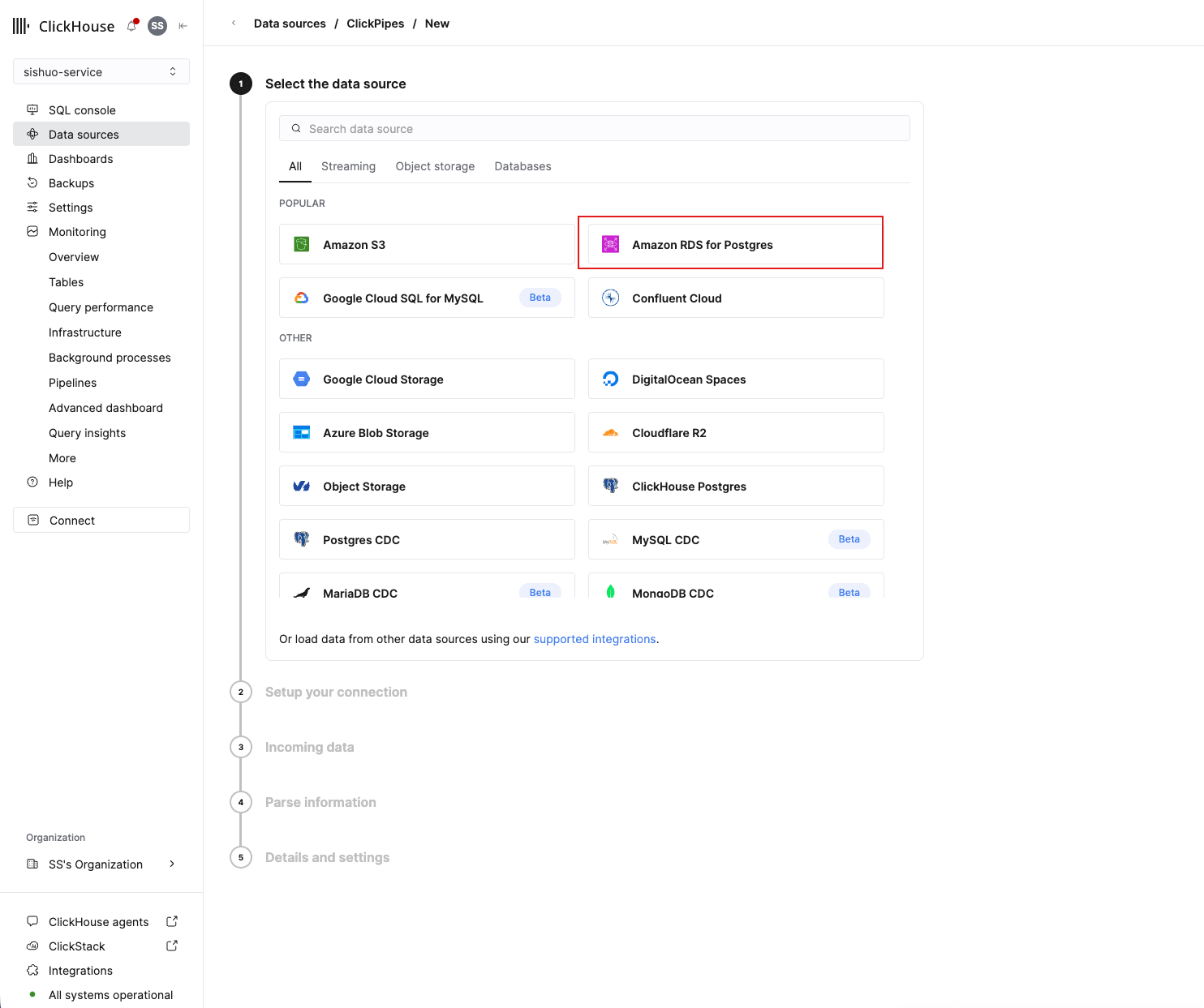
It then accepts your RDS details without complaint, which is why the mistake survives to the connection attempt:
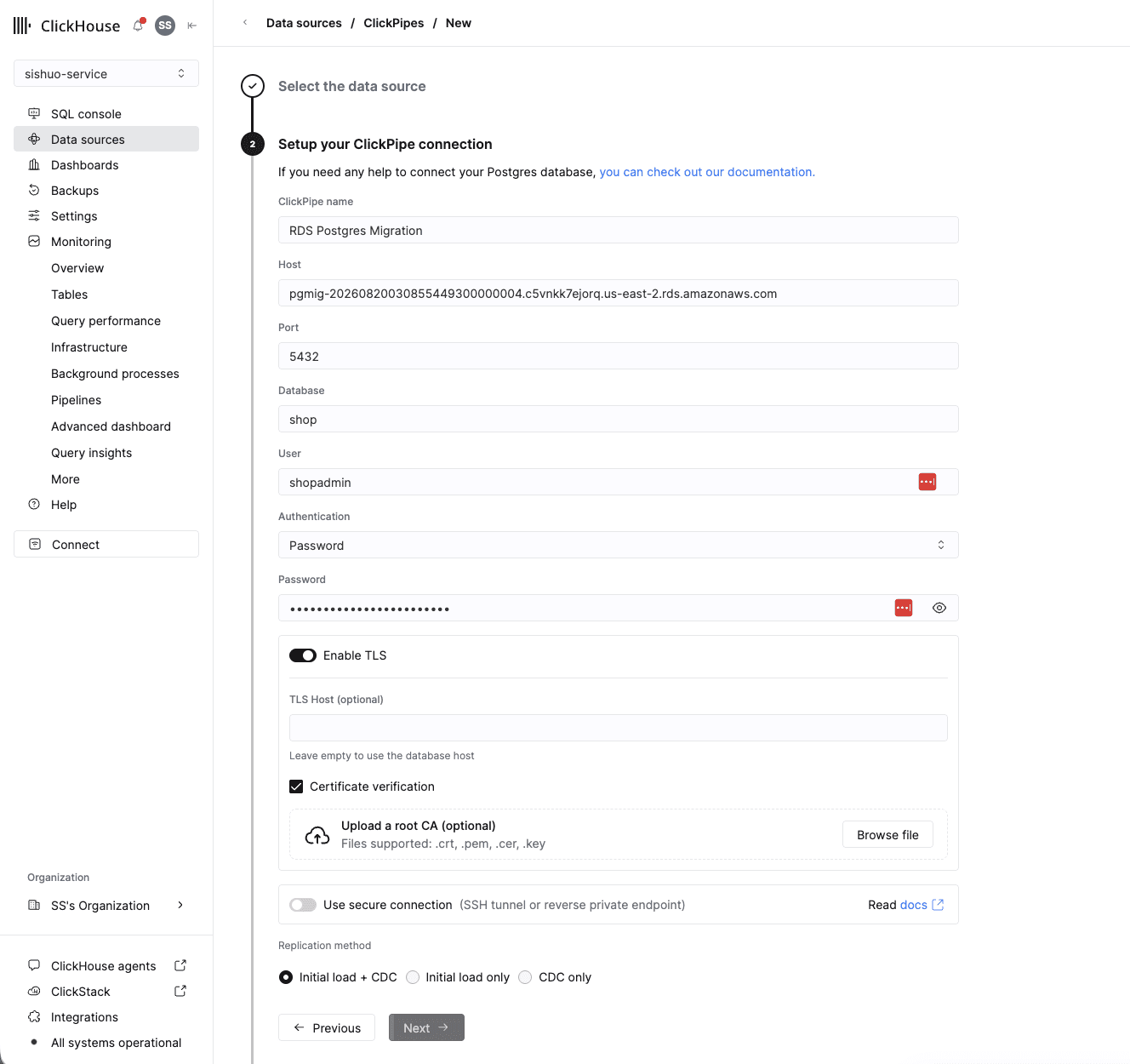
-
If the flow was right, check the region anyway. The static addresses belong to the region your ClickHouse Cloud side runs in, not to your RDS instance's region, and the two are only the same if you followed module 00. Set
CLICKPIPES_REGIONto the region shown on your Managed Postgres service's card, regenerateterraform.tfvarswith module 03 Step 2's command, andterraform apply.
Also rule out a connection pooler, which cannot carry logical decoding at all.
-
A retried pipe fails to create a slot
-
Symptom - creating the pipe fails with
all replication slots are in use, or a slot from an earlier attempt is present and inactive. -
Why - deleting a pipe while the source is unreachable leaves the source's slot behind, and so does any attempt that died before it finished tidying up. The Terraform raises
max_replication_slotsto 10 to give you room for retries, but each orphaned slot also pins WAL and grows the instance's storage. -
Fix - list the slots, drop the orphan by name, and only then retry:
psql -h "$RDS_HOST" -U shopadmin -d shop -c 'SELECT slot_name, active FROM pg_replication_slots' psql -h "$RDS_HOST" -U shopadmin -d shop -c "SELECT pg_drop_replication_slot('<slot-name>')"pg_drop_replication_slotonly works on an inactive slot, which is the safety property you want: it cannot pull the slot out from under a pipe that is still reading.
The ClickHouse leg
Every panel returns permission denied for foreign table
-
Symptom - after
06_pg_clickhouse.sql, dashboard panels fail withpermission denied for foreign table order_items. -
Why -
IMPORT FOREIGN SCHEMAcreates the foreign tables owned by the user that ran it, so aGRANTissued before the import granted nothing. This looks exactly like asearch_pathproblem and is not one. -
Fix - re-grant after the import:
GRANT SELECT ON ALL TABLES IN SCHEMA ch TO shop_analytics;
The dashboard still reads Postgres after the reroute
-
Symptom -
ALTER ROLE shop_analytics SET search_path = ch, publicsucceeded, but panel timings are unchanged andEXPLAINshows a local heap scan. -
Why - a role-level
SET search_pathapplies to new sessions. A pooled reader such as Grafana keeps its existing connections, and a client that setssearch_pathitself on connect overrides the role setting entirely. -
Fix - recycle the pool (restart the Grafana container), then verify per role rather than per panel:
SHOW search_path;
EXPLAIN (VERBOSE) SELECT date_trunc('hour', placed_at), sum(line_total)
  FROM order_items WHERE placed_at >= now() - interval '7 days' GROUP BY 1;
As
shop_analyticsthat must show a foreign scan; asshop_writerit must still show the local heap. To roll back,ALTER ROLE shop_analytics RESET search_path.