03 Replicate
Create the Managed Postgres instance and the migration ClickPipe, watch the initial load hand over to CDC, and break replication on purpose to see what an orphaned slot costs.
Everything before this was provisioning. This module builds the replication leg and proves it works; module 05 spends it on a cutover.
cd "$(git rev-parse --show-toplevel)/workshops/postgres_migration"Outcome
A migration ClickPipe streaming RDS into ClickHouse Managed Postgres, caught up and verified from the source's own catalog, with the schema and both roles in place on the target. On the way there you deliberately break replication, watch WAL pile up on the source, and repair it — because the abort criterion you wrote in module 02 exists for exactly that failure.
Step 1 — Create the Managed Postgres instance
Create it from the command line with the clickhousectl you authenticated in module 00, in the
same region as your RDS instance:
clickhousectl cloud postgres create \
  --name pgmig-target \
  --provider aws \
  --region "$AWS_REGION" \
  --size c6gd.large \
  --pg-version 17 \
  --ha-type none
Use $AWS_REGION rather than typing a region: a cross-region pair adds wide-area latency to every
lag figure you are about to read and to the cutover window itself. --ha-type none keeps the comparison honest: the RDS
instance is single-AZ, so a synchronously replicated target would not be the same experiment.
Save the three values it returns — the Postgres ID, the hostname, and the one-time
postgres password. Then export them:
export TARGET_PG_ID="<postgres-id>"
export TARGET_HOST="<hostname-from-clickhousectl>"
export TARGET_ADMIN=postgres
export TARGET_ADMIN_PASSWORD="<one-time-password>"
If you lose the password, mint a new one rather than recreating the instance:
clickhousectl cloud postgres reset-password "$TARGET_PG_ID"Do not use list or get as the readiness check
Managed Postgres is in beta, and clickhousectl cloud postgres list and get can return empty or
FORBIDDEN depending on your API key's role. The psql connection below is the readiness check.
The console flow is at Managed Postgres if you
would rather click, and it is where you set the IP allowlist so psql and later Grafana can
reach the instance.
Managed Postgres runs on locally-attached NVMe rather than network-attached storage, ships
pg_clickhouse pre-installed, and gives you full superuser access — which is why module 07 can
CREATE EXTENSION without a support ticket. Provisioning takes a few minutes; this is the readiness
check, and it is worth retrying rather than treating a first failure as a problem:
psql "postgresql://${TARGET_ADMIN}:${TARGET_ADMIN_PASSWORD}@${TARGET_HOST}:5432/postgres?sslmode=require" -c "SELECT version();"Create the database:
psql "postgresql://${TARGET_ADMIN}:${TARGET_ADMIN_PASSWORD}@${TARGET_HOST}:5432/postgres?sslmode=require" \
  -c "CREATE DATABASE shop;"
export TARGET_DSN="postgresql://${TARGET_ADMIN}:${TARGET_ADMIN_PASSWORD}@${TARGET_HOST}:5432/shop?sslmode=require"
psql "$TARGET_DSN" -c "SHOW wal_level;"
Step 2 — Let ClickPipes reach RDS
The pipe reads from your source, so ClickPipes dials out to RDS. Not the other way round, and
not from your Managed Postgres instance either — the mover is the ClickPipes service, and it is
what has to get through your security group. That single fact decides the whole network shape: RDS
is publicly_accessible = true and its security group allowlists subscriber_cidrs, which
currently holds only your own address.
ClickPipes egresses from a documented, static set of addresses per region, published by the Cloud API. The addresses belong to the region your ClickHouse Cloud side runs in, not the region your RDS instance is in. Module 00 put everything in one region so these coincide; set it explicitly anyway, because a mismatch produces a pipe that times out with every rule looking correct.
export CLICKPIPES_REGION="$AWS_REGION" # change this if your Managed Postgres is elsewhereRegenerate terraform.tfvars with your own address plus every ClickPipes address for that region:
cd "$(git rev-parse --show-toplevel)/workshops/postgres_migration/terraform"
python3 -c 'import json, sys, urllib.request as u
aws_region, cp_region, me = sys.argv[1], sys.argv[2], sys.argv[3]
data = json.load(u.urlopen("https://api.clickhouse.cloud/static-ips.json"))
match = [x for x in data["aws"] if x["region"] == cp_region]
if not match:
    sys.exit("no ClickPipes egress IPs published for " + cp_region)
cidrs = [me + "/32"] + [ip + "/32" for ip in sorted(match[0]["clickpipes_egress_ips"])]
print("region           = \"%s\"" % aws_region)
print("subscriber_cidrs = %s" % json.dumps(cidrs))' \
  "$AWS_REGION" "$CLICKPIPES_REGION" "$(curl -fsS https://checkip.amazonaws.com)" > terraform.tfvars
echo "RDS region: $AWS_REGION   ClickPipes egress region: $CLICKPIPES_REGION"
cat terraform.tfvars
Expect your own /32 first and then one per ClickPipes address for that region — six, for
us-east-2. The two regions are used for different things: region in the file is where Terraform
manages your RDS instance, and the egress addresses come from the ClickPipes region.
The command rewrites the whole file, which is safe because module 00 wrote only these two variables;
merge back any others you added. It also refreshes your own /32, so a change of network or VPN
since module 00 is fixed at the same time.
Now apply. Only the security group changes; the instance is untouched.
terraform applyThis allowlist is wider than anything you would ship
You are opening port 5432 on a publicly reachable database to a set of addresses you were handed. That is acceptable for a workshop instance holding generated data for an afternoon, and it is not a pattern to carry to production. In production the same leg runs over private connectivity — a reverse private endpoint rather than a public allowlist — and the allowlist is the exception you make for a migration and revert the day it finishes. Module 07's teardown is that revert.
A pipe that never leaves its initial state is almost always this list.
No connection poolers on this leg
CDC-based replication does not work through a Postgres proxy — PgBouncer, RDS Proxy, Supabase Pooler and the rest are all unsupported, because logical decoding needs a real backend on a real replication connection, and a pooler does not give it one. Point the pipe at the instance endpoint.
This workshop's Terraform never creates an RDS Proxy, so you will not trip over it here. On a production source a pooler in front of Postgres is the normal arrangement, and the pipe will simply refuse to establish CDC.
The three ways ClickPipes reaches a source, and why this one
You have just used the simplest of three options, and the one you would be least likely to choose in production. The other two are what a production deployment of this leg uses.
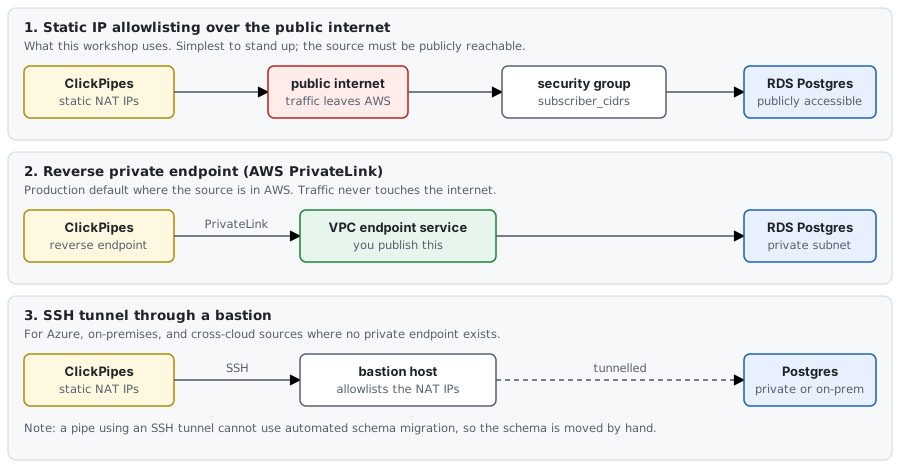
1. Static IP allowlisting, over the public internet. What you just did. ClickPipes connects out from a fixed set of NAT addresses per region and your firewall lets exactly those in. It works for any publicly reachable source in any region, needs nothing provisioned on your side beyond a firewall rule, and the documentation is blunt about the trade: it is not appropriate for sensitive deployments, because the traffic crosses the public internet and the database has to be reachable from it at all. That is acceptable here — a workshop instance holding generated data for an afternoon.
2. A reverse private endpoint. ClickPipes creates an endpoint inside its own VPC that points at a private endpoint service you publish, so traffic never touches the internet and your database needs no public address. On AWS that is PrivateLink, and it works across regions. This is what to reach for when the source is in AWS, as it is here; the public allowlist you just wrote is the shortcut. Support elsewhere is narrower: on GCP it is Private Service Connect and covers AlloyDB only, without global access; on Azure there is no private-endpoint path for this and the documented answer is option 3.
3. An SSH tunnel through a bastion. The connection is tunnelled through a jump host you own. You still allowlist the ClickPipes NAT addresses, but on the bastion rather than on the database, so the database itself stays private. This is the documented route for Azure sources, for on-premises Postgres, and for cross-cloud or cross-region pairs where no private endpoint exists.
One consequence reaches back into Step 3: a pipe using an SSH tunnel cannot use automated schema
migration. If you take this route you move the schema yourself with pg_dump and psql and select the manual
option when you create the pipe, which is the alternative path in Step 3.
The full matrix, including which sources support which option, is in the ClickPipes networking documentation.
Step 3 — Create the two roles on the target
The pipe migrates the schema for you: tables, indexes, constraints, sequences. It does not
migrate roles, and no tool that works by dumping a database can, because roles are cluster-global
objects rather than members of any one database. pg_dump never emits them whatever flags you
pass, so the pipe's schema step has nothing to carry.
Create both roles with the same passwords you used in module 01:
psql "$TARGET_DSN" \
  -c "CREATE ROLE shop_writer LOGIN PASSWORD '${WRITER_PASSWORD}';" \
  -c "CREATE ROLE shop_analytics LOGIN PASSWORD '${ANALYTICS_PASSWORD}';"
psql "$TARGET_DSN" -c "SELECT rolname, rolcanlogin FROM pg_roles WHERE rolname LIKE 'shop%' ORDER BY rolname;"
The same passwords are what make the connection host the only thing that changes at cutover. Different passwords and the cutover becomes a credential rollout as well as a migration, and "the application did not change" stops being true.
Grants come later, in Step 5, and they have to: GRANT ... ON ALL TABLES resolves the table list at
the moment it runs, and right now the target has no tables. Run it before the pipe builds the
schema and it silently grants nothing.
Leave the shop database empty
Automated schema migration requires an empty target database — the pipe refuses rather than merging
into an existing schema. The shop database you created in Step 1 is empty and must stay that way
until the pipe runs. Roles are not in the database, so creating them does not violate this.
If you would rather move the schema yourself — because the target already has tables, because you are using an SSH tunnel, which the automated path does not support, or because you want to read what you are applying — the manual path is a schema-only dump into the target before the pipe is created, and then you select manual schema migration when you create it:
pg_dump --schema-only --no-owner --no-privileges \
  -h "$RDS_HOST" -p 5432 -U shopadmin -d shop -f /tmp/schema.sql
psql "$TARGET_DSN" -v ON_ERROR_STOP=1 -f /tmp/schema.sql
--no-privileges drops the grants, because the roles they reference did not exist at dump time.
You re-apply them in Step 5 either way. sql/03_publication.sql is the publication side, if you are
doing the whole leg by hand with logical replication rather than a pipe. If pg_dump refuses with a
server version mismatch, your client is older than the RDS server; the recovery is in
Troubleshooting.
Step 4 — Create the migration pipe
This is the one step in the workshop that has to be done in the console. Managed Postgres and this flow are both in public beta, so screens move; the current ones are in the migration documentation. The decisions are fixed.
Start from the Postgres service, not a ClickHouse service
There are two different flows called ClickPipes and only one of them does this job.
- On a ClickHouse service, Data sources gives you ClickPipes with a source list including "Amazon RDS for Postgres". That builds a Postgres-to-ClickHouse pipe. It is module 06's leg, not this one, and it will happily accept your RDS details and then land rows in the wrong place.
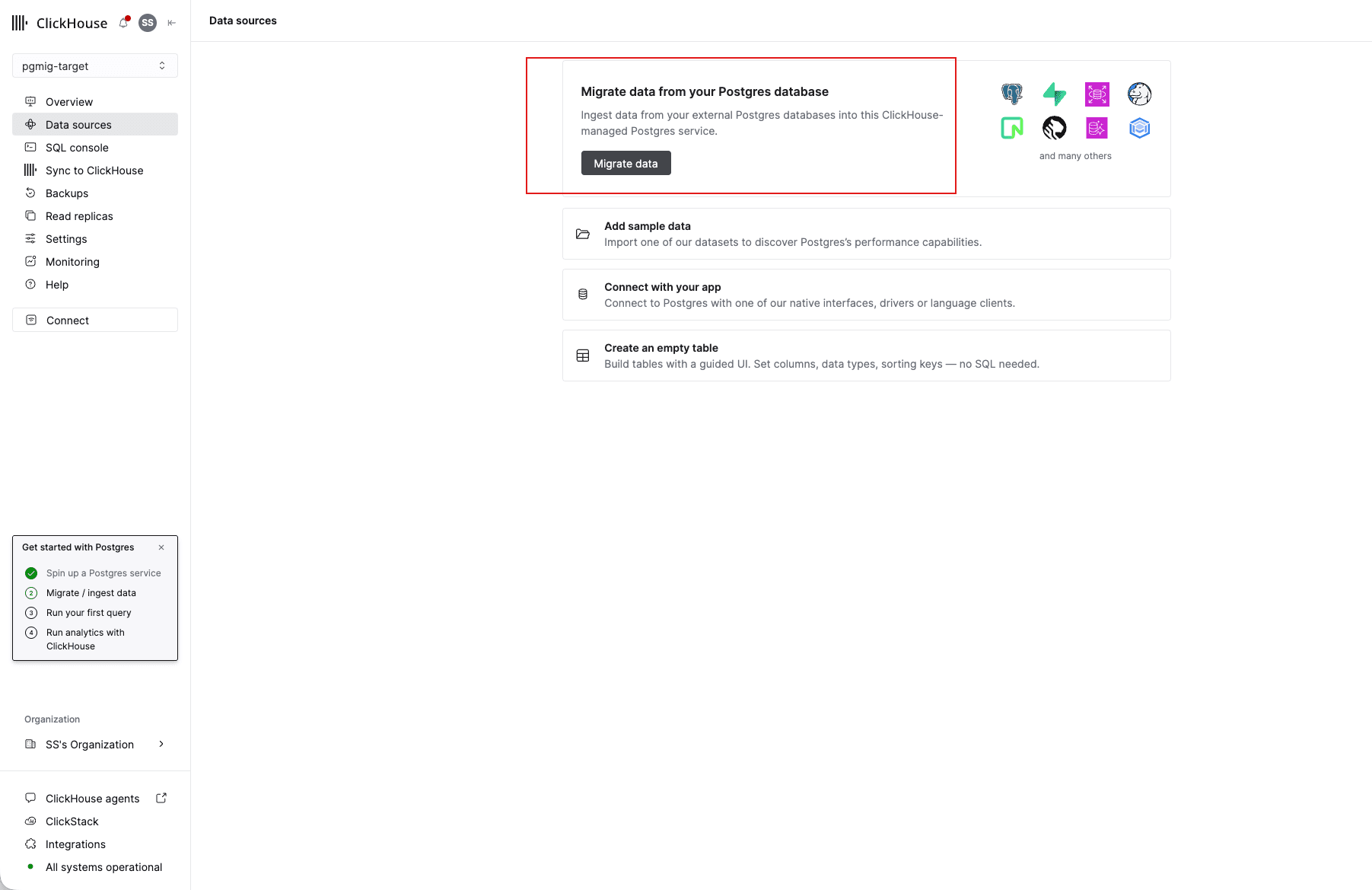
- On your Managed Postgres service, Data sources gives you Migrate data. That is this one.
A pipe runs in its own service's region. Build this one from a ClickHouse service in another
region and it egresses from addresses your security group does not allowlist, giving
dial error: timeout with every rule looking correct — recovery in
Troubleshooting.
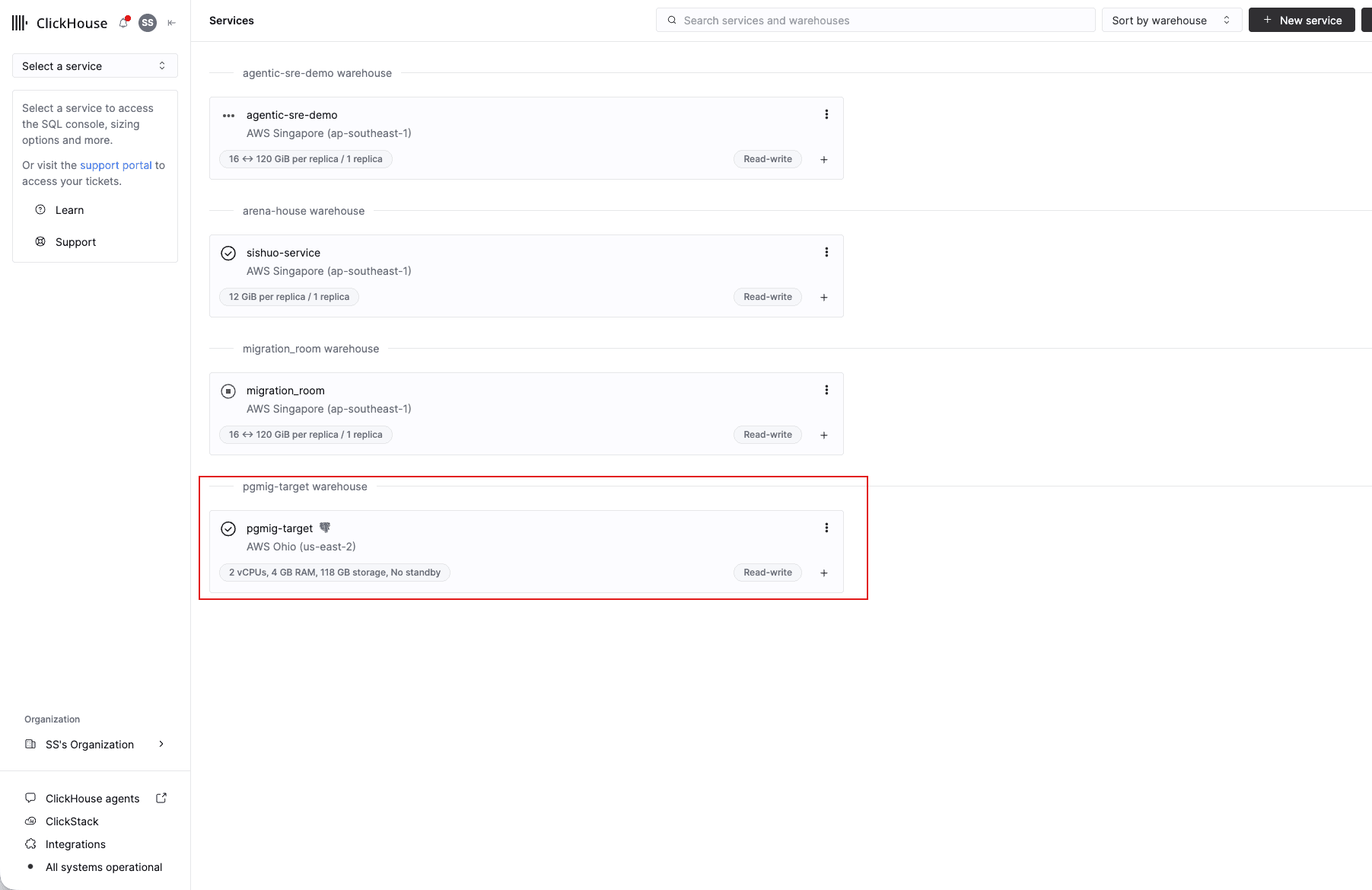
1. Pick the Managed Postgres service
pgmig-target, the instance you created in Step 1. Check the region on the card matches
CLICKPIPES_REGION before you click into it.
2. Data sources, then Migrate data
The panel reads "Migrate data from your Postgres database — ingest data from your external Postgres databases into this ClickHouse-managed Postgres service." That sentence is how you know you are in the right flow.
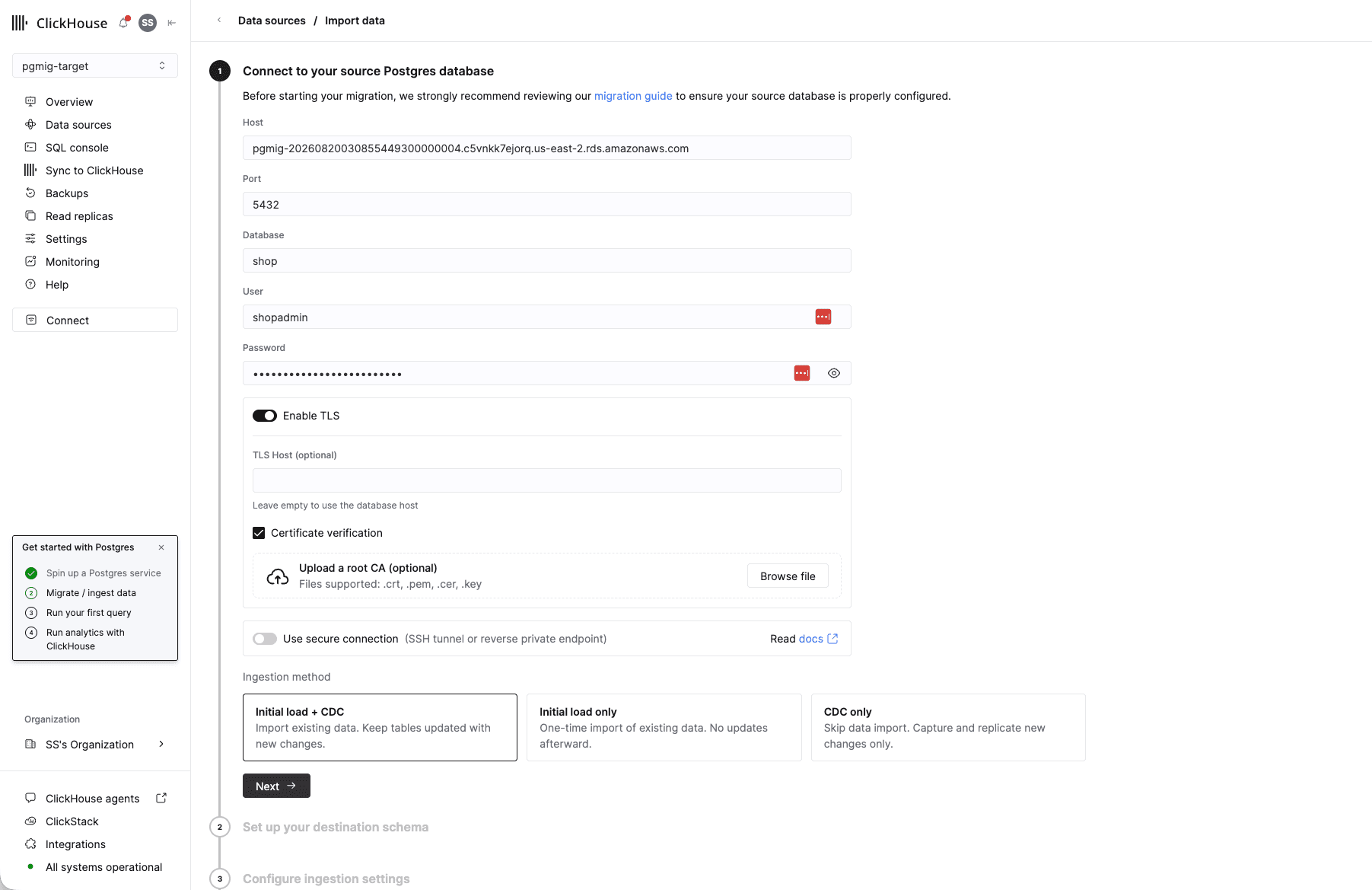
3. Connect to your source Postgres database
Get the four connection values out of the shell first. You are typing into a browser, so they have to reach the clipboard; all four come from Terraform state, and nothing here needs them on screen:
cd "$(git rev-parse --show-toplevel)/workshops/postgres_migration/terraform"
EP="$(terraform output -raw rds_endpoint)"
printf 'host     = %s\nport     = %s\ndatabase = shop\nuser     = shopadmin\n' "${EP%%:*}" "${EP##*:}"
terraform output -raw rds_admin_password | pbcopy && echo "password is on the clipboard"
If the clipboard pipe is unavailable, print the password instead — it goes to your scrollback and shell history, so avoid it on a shared screen:
terraform output -raw rds_admin_password; echoIf PGPASSWORD is still set from module 01, that is the same value and you need neither command.
With those to hand, fill in the form. Enable TLS stays on and Certificate verification stays checked: the leg crosses the public internet.
Leave Use secure connection (SSH tunnel or reverse private endpoint) off. That toggle is where the other two network options from Step 2 live, and turning it on is what a production deployment would do — with the consequence that automated schema migration is then unavailable.
Choose Initial load + CDC. The other two cannot support a cutover: initial-load-only stops replicating the moment it finishes, and CDC-only arrives with no history.
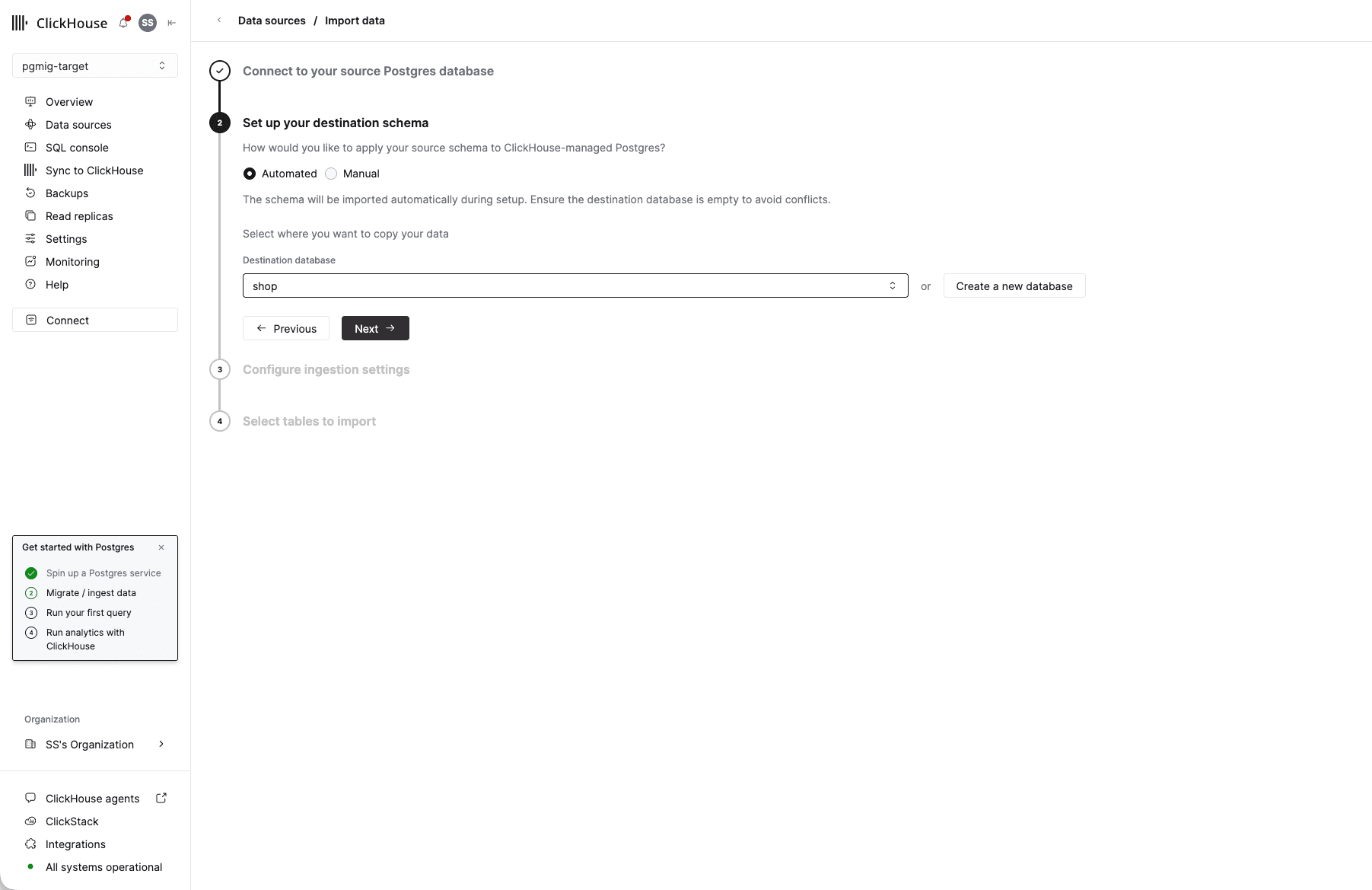
4. Set up your destination schema
Automated, and the destination database is shop — the one you created in Step 1. The panel
says it plainly: "Ensure the destination database is empty to avoid conflicts." It is, because Step
3 created only roles, which are cluster-global and live outside any database.
Pick Manual instead if you dumped the schema yourself in Step 3, or if you are using an SSH tunnel, which cannot use the automated path.
5. Configure ingestion settings
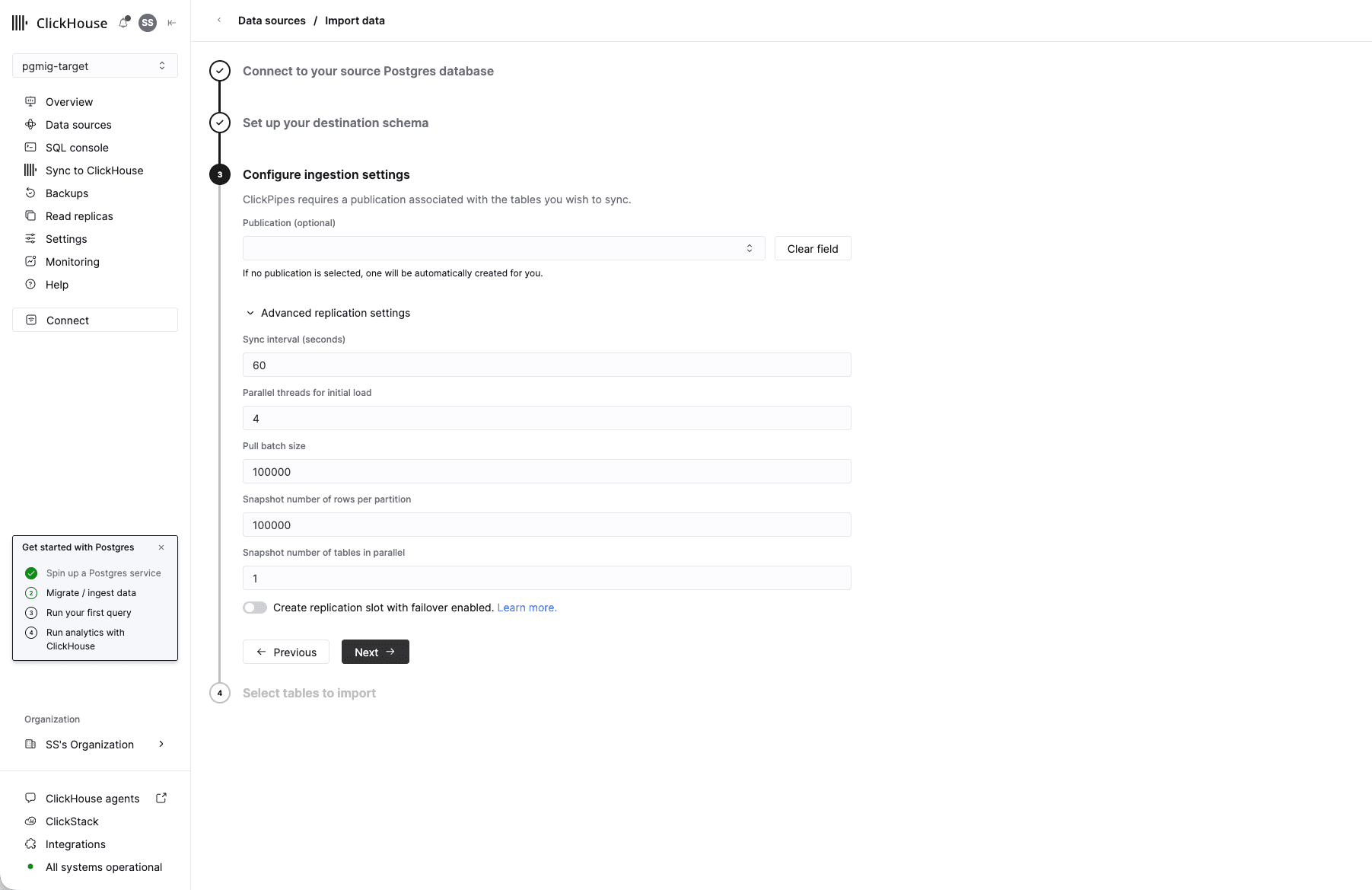
Leave Publication empty. The note under it — "If no publication is selected, one will be
automatically created for you" — is the pipe telling you it manages the primitive on your behalf,
which is the publication you read back out of pg_publication_tables in Step 5.
The advanced settings can stay at their defaults for this workshop: sync interval 60 seconds, four parallel threads for the initial load, batch and snapshot sizes of 100,000. Leave Create replication slot with failover enabled off; it matters for a highly available source, and your RDS instance is single-AZ on purpose.
6. Select tables to import
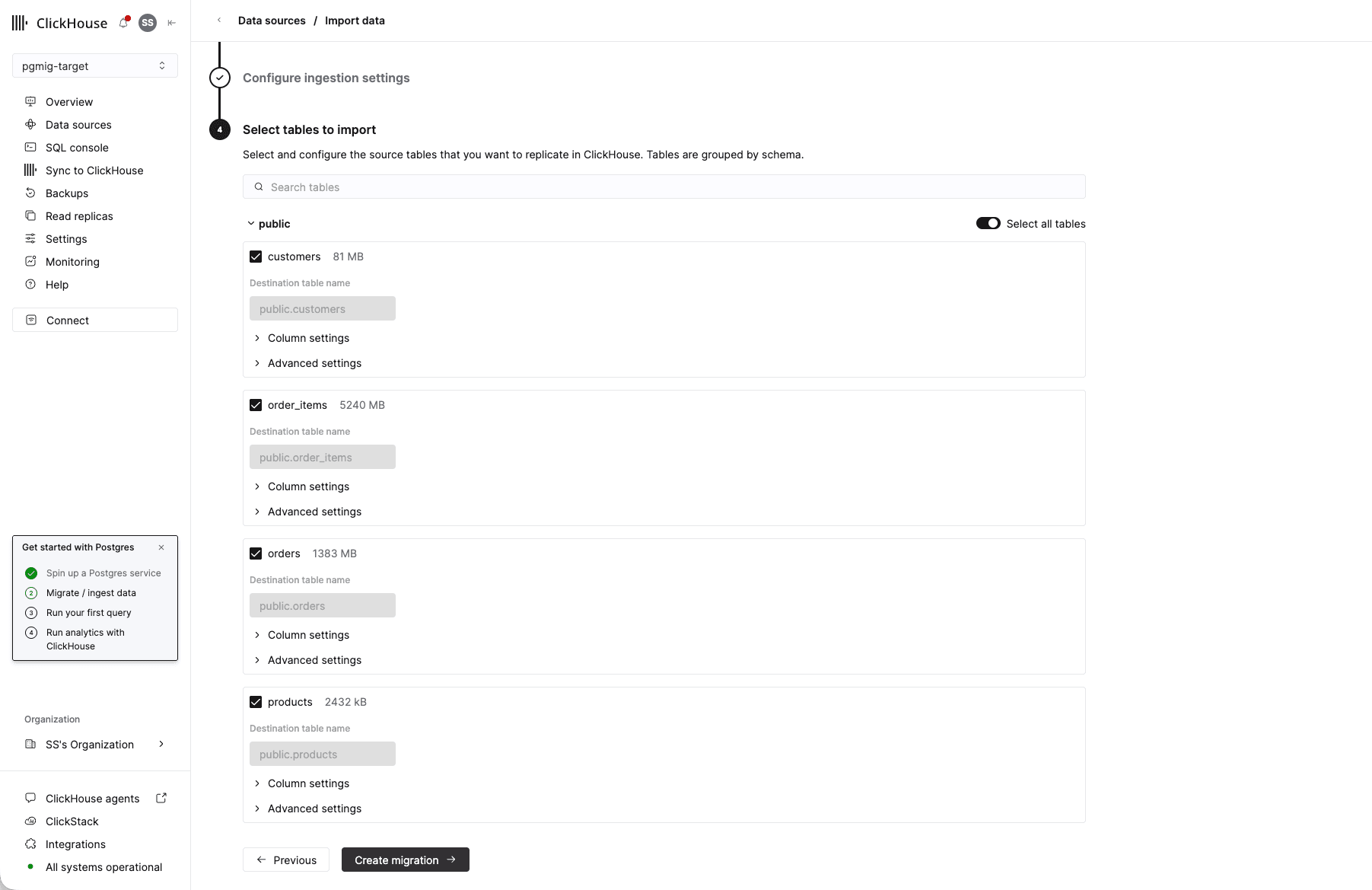
The four shop tables, explicitly. Do not use "Select all tables".
The sizes shown are a useful sanity check on your own seed: order_items around 5,240 MB, orders
around 1,383 MB, customers 81 MB, products 2,432 kB. If order_items is far smaller than that,
your seed did not finish and you are about to migrate a partial fact table.
Then Create migration.
7. Confirm it was created
Data sources now lists a Postgres to Postgres data ingestion row: source database shop, four
tables, and a status that starts at Provisioning. View metrics is where the pipe reports its
own progress.
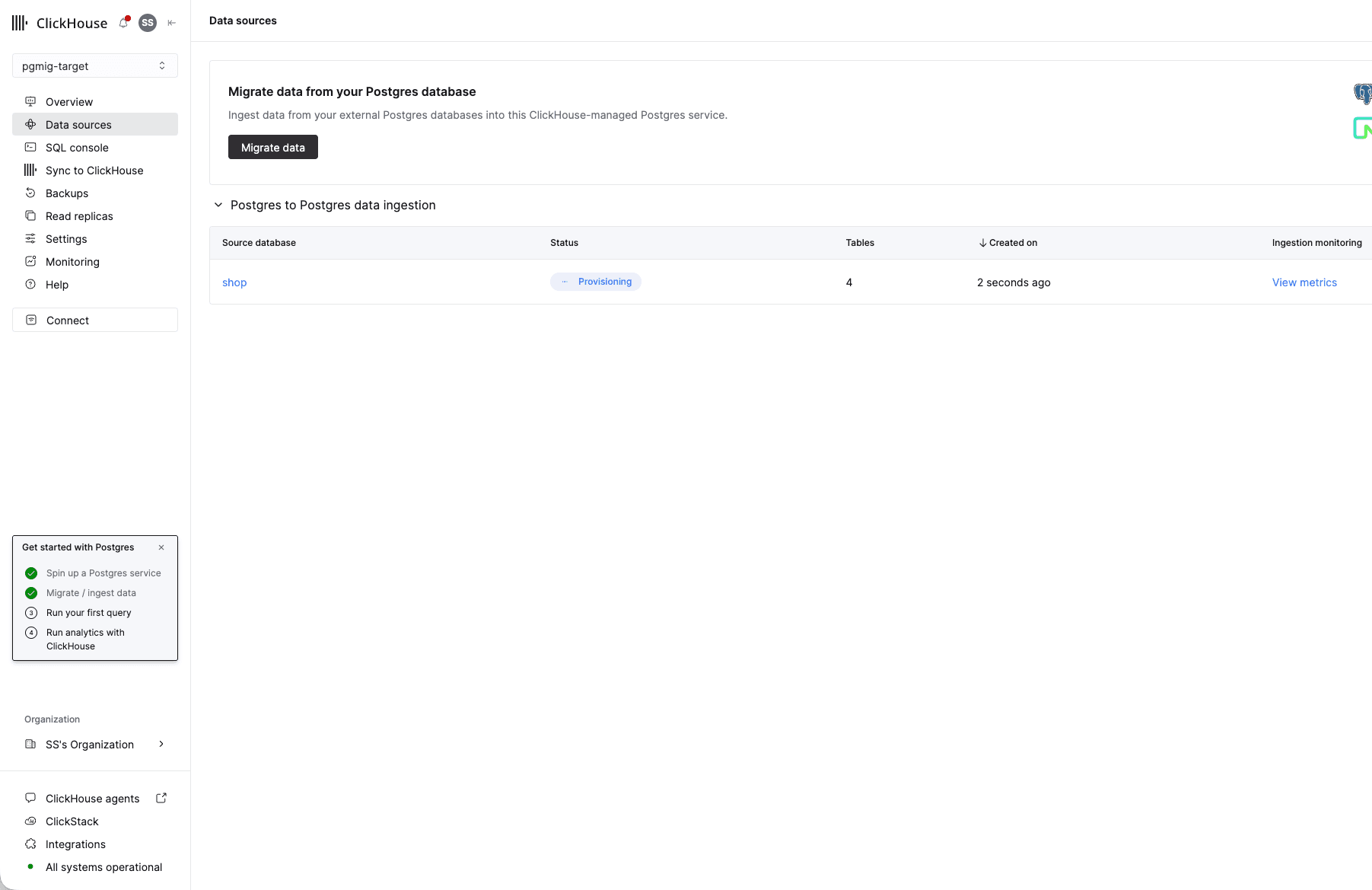
Provisioning is not loading. Step 5 is where you check that rows are actually moving, and it reads the source rather than this page.
The settings, as a table
| Setting | Value, and why |
|---|---|
| Source host, port, database | Your RDS endpoint, 5432, shop. The instance endpoint, never a pooler |
| Source user and password | shopadmin, and the Terraform-generated password from screen 3 above |
| TLS | On. RDS accepts it and the leg crosses the public internet |
| Ingestion method | Initial load + CDC. Initial-load-only cannot cut over; CDC-only would arrive with no history |
| Schema migration | Automated, unless you took the manual path in Step 3 |
| Tables | customers, products, orders, order_items — selected explicitly |
Select those four tables rather than accepting the whole database. This is the module 02 scope decision, and it is a decision whichever way you go: an enumerated list means a table added next week is out of scope until a human changes the pipe, and accepting everything means it is enrolled without review. Either is defensible written down. Neither is defensible as an unexamined default.
Creating the pipe does two things in one action: it takes a snapshot and copies every existing row in those four tables, in parallel, and then streams everything committed after that snapshot. The writer is still running against RDS throughout. You have not quiesced anything and are not about to.
PROVISIONAL: 25 to 40 minutes for the initial load of the seed's 60,520,000 rows plus whatever the writer has added by then, replaced by a measured figure after the end-to-end run.
Step 5 — Watch the initial load, then the handover to CDC
Two vantage points, and they answer different questions. The console is the pipe's own account of itself — status, rows loaded per table, replication lag. Read it first.
Then read the source: the pipe is built on a Postgres replication slot, and that slot is still yours to inspect.
psql -h "$RDS_HOST" -c "SELECT slot_name, plugin, active, restart_lsn, confirmed_flush_lsn,
  pg_size_pretty(pg_wal_lsn_diff(pg_current_wal_lsn(), confirmed_flush_lsn)) AS behind
  FROM pg_replication_slots;"
psql -h "$RDS_HOST" -c "SELECT pubname, puballtables FROM pg_publication;"
psql -h "$RDS_HOST" -c "SELECT schemaname, tablename FROM pg_publication_tables ORDER BY tablename;"
The pipe created that publication and that slot on your behalf. puballtables reads f and
pg_publication_tables lists exactly the four tables you chose — your scope decision, recorded in
the source's catalog. If it lists more than four, the pipe's table selection was wider than you
intended.
confirmed_flush_lsn is the position the consumer has confirmed it flushed, and behind is how far
the source has run past it. During the initial load behind grows, because the slot is holding
everything committed since the snapshot while the copy works through history. When the load finishes
and CDC takes over, behind collapses from gigabytes to kilobytes and stays there.
Watch it converge:
while true; do
  psql -h "$RDS_HOST" -At -c "SELECT now()::time(0), pg_size_pretty(pg_wal_lsn_diff(pg_current_wal_lsn(), confirmed_flush_lsn)) FROM pg_replication_slots;"
  sleep 15
done
PROVISIONAL: steady-state lag under 2 MB with the writer at 200 orders per second in-region, replaced by a measured figure after the end-to-end run.
Stop the loop with Ctrl+C once the number has stopped falling. Confirm the target agrees:
psql "$TARGET_DSN" -c '\dt'
psql "$TARGET_DSN" -c "SELECT count(*) FILTER (WHERE order_id <= 12000000) AS from_seed,
                              count(*) FILTER (WHERE order_id  > 12000000) AS from_writer,
                              count(*) AS total
                       FROM order_items;"
from_seed must reach exactly 48,000,000, the same fixed number as on RDS — see
What the numbers should be.
from_writer will be behind the source's and still moving, which is correct: the writer is
committing to RDS while the pipe carries those commits across. The totals are supposed to differ
between source and target while a writer is running, so do not treat that as a fault. Levelness is
what the LSN gate in module 05 establishes, and it is only reachable once writes stop.
Now apply the grants Step 3 deferred:
psql "$TARGET_DSN" \
  -c "GRANT SELECT, INSERT, UPDATE ON ALL TABLES IN SCHEMA public TO shop_writer;" \
  -c "GRANT USAGE, SELECT ON ALL SEQUENCES IN SCHEMA public TO shop_writer;" \
  -c "GRANT SELECT ON ALL TABLES IN SCHEMA public TO shop_analytics;"
Module 05 needs these the moment the writer is repointed, which happens inside the cutover window, so they are applied now rather than there.
Verify rather than trusting the three success messages — a grant that matched no tables succeeds identically to one that worked:
psql "$TARGET_DSN" -c "SELECT has_table_privilege('shop_writer','public.orders','INSERT') AS writer_insert,
       has_table_privilege('shop_writer','public.orders','UPDATE') AS writer_update,
       has_sequence_privilege('shop_writer','public.orders_order_id_seq','USAGE') AS writer_seq,
       has_table_privilege('shop_analytics','public.order_items','SELECT') AS analytics_select;"
All four must read t. They are the four privileges module 05 depends on. Re-run this after any pipe
resync, which can drop and recreate a table and take its grants with it.
Four tables with the same definitions, the same indexes and the same sequences as the source, and rows arriving. Note one thing now, for module 05: the sequences exist, and not one of them has ever been advanced.
psql "$TARGET_DSN" -c "SELECT sequencename, last_value FROM pg_sequences ORDER BY sequencename;"last_value is empty on all four — NULL, not zero and not 1. pg_sequences.last_value stays
NULL until something calls nextval(), and nothing on the target ever has: replicated rows arrive
carrying their own key values, so they are inserted without consulting the sequence.
The same query on the source, where the seed and the writer have been drawing from them:
psql -h "$RDS_HOST" -c "SELECT sequencename, last_value FROM pg_sequences ORDER BY sequencename;" customers_customer_id_seq | 500000
order_items_order_item_id_seq | 48117877
orders_order_id_seq | 12047089
products_product_id_seq | 20000Twelve million orders rows on the target and a sequence that has never issued a number. That gap
is the failure in Step 7, and you are looking straight at it.
Step 6 — Break it on purpose
Do this before the cutover, while nothing is at stake. It is the cheapest possible staging of the incident that takes down real Postgres fleets, and it is the reason your runbook needed an abort criterion rather than only a success path.
Pause the pipe. Open it from Data sources, then the Settings tab: Pause and Delete
sit at the top under ClickPipe actions.
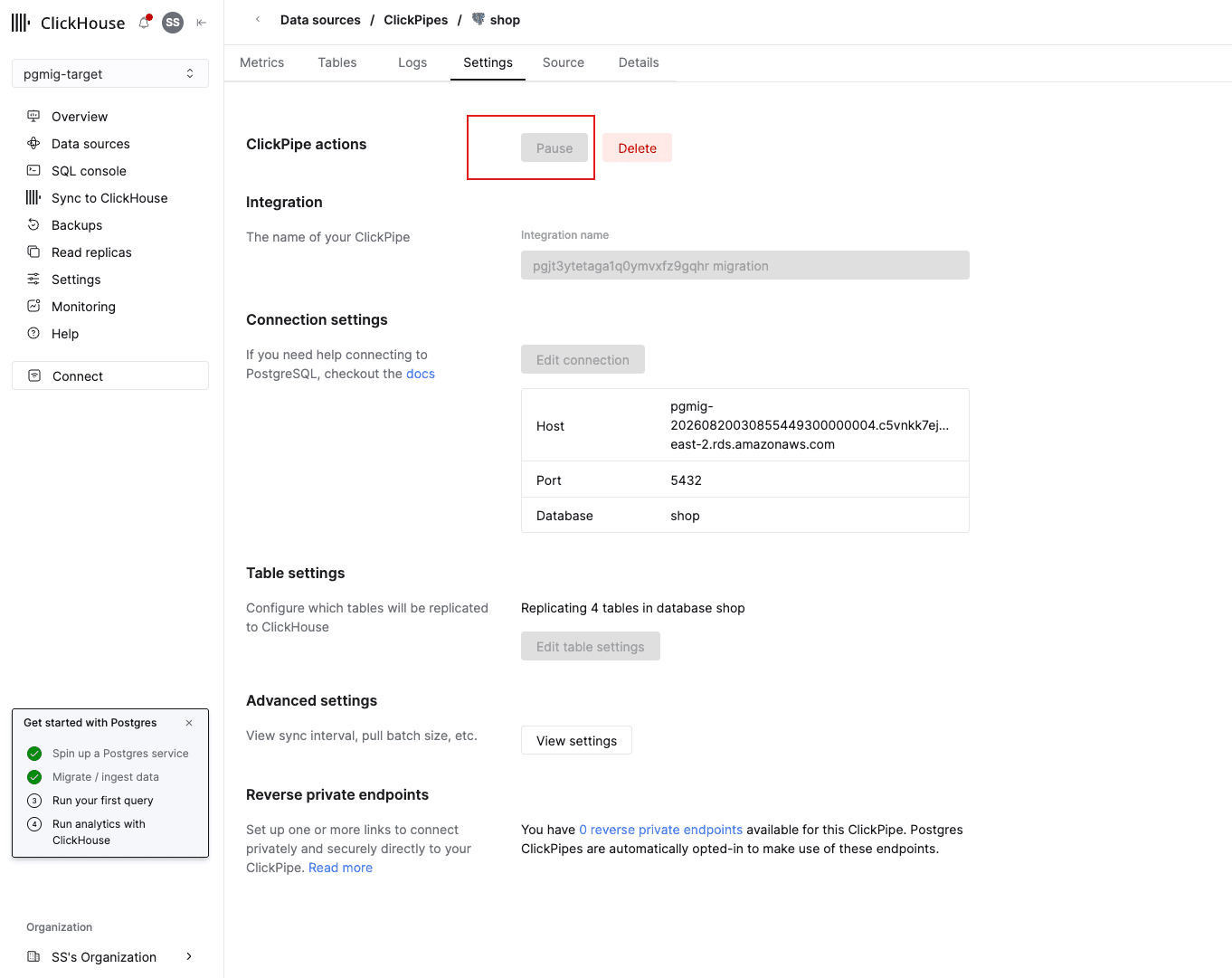
A pause is the supported, reversible control, and it is what an operator reaches for when something downstream looks wrong — which is what makes the consequence worth seeing.
Nothing appears to happen. The writer keeps committing to RDS at 200 orders a second, the dashboard keeps serving, no error is logged anywhere a person is looking. Now watch the source:
for i in $(seq 1 12); do
  psql -h "$RDS_HOST" -At -F ' | ' -c "SELECT now()::time(0),
    (SELECT confirmed_flush_lsn::text FROM pg_replication_slots LIMIT 1),
    pg_size_pretty(pg_wal_lsn_diff(pg_current_wal_lsn(), (SELECT confirmed_flush_lsn FROM pg_replication_slots LIMIT 1))),
    pg_size_pretty(sum(size)) FROM pg_ls_waldir();"
  sleep 30
done
Three things to see in that output, and the third is the incident:
confirmed_flush_lsnfreezes. It is the last position the consumer confirmed, and there is no consumer reading right now. It will not move again until you resume the pipe.- The
behindfigure grows monotonically, roughly linearly in the writer's rate. - The total size of
pg_walgrows with it, and does not get reclaimed. This is the part that ends careers. Postgres cannot recycle a WAL segment that a replication slot still needs, and this slot needs all of them, forever, because nothing is consuming them. The instance's disk is now filling at the rate the application writes, and no amount ofVACUUM, log rotation or checkpoint tuning will free a byte of it.
PROVISIONAL: about 1.1 GB of WAL retained per hour with the writer at 200 orders per second, replaced by a measured figure after the end-to-end run.
On RDS, the CloudWatch metrics that see this coming are OldestReplicationSlotLag,
TransactionLogsDiskUsage and FreeStorageSpace:
aws cloudwatch get-metric-statistics \
  --namespace AWS/RDS --metric-name OldestReplicationSlotLag \
  --dimensions "Name=DBInstanceIdentifier,Value=${RDS_INSTANCE_ID}" \
  --start-time "$(date -u -d '30 minutes ago' +%Y-%m-%dT%H:%M:%SZ 2>/dev/null || date -u -v-30M +%Y-%m-%dT%H:%M:%SZ)" \
  --end-time "$(date -u +%Y-%m-%dT%H:%M:%SZ)" \
  --period 300 --statistics Maximum --output table
Now repair it: resume the pipe from the same page.
Watch the same loop again. confirmed_flush_lsn starts moving, behind falls, and once the slot
releases the segments, pg_wal shrinks back at the next checkpoint. Nothing was lost: every
transaction committed during the outage was in the WAL the slot was holding, which is precisely
why it was holding it.
The lesson is a pair, and both halves matter:
- A paused pipe is not a paused pipeline. It is a disk-fill timer, running at the source's write rate, on the source's disk, with the symptom pointing at the wrong machine. Nothing in the pipe's own status says "your source is filling up," because from the pipe's point of view being paused is a state you asked for.
- A deleted-and-forgotten slot is worse than a paused one, because there is nobody left to
resume. Deleting the pipe is supposed to remove the slot with it, and against a reachable source
it does — but a source that is unreachable at that moment keeps the slot, and the slot then
outlives everything that knew about it. That is why ClickHouse's own cutover procedure ends with
an explicit
pg_drop_replication_slot, why module 07's teardown deletes the pipe before destroying RDS, and why your module 02 abort procedure had to say what state an abort leaves the slot in.
This is what Step 5's detour into pg_replication_slots bought you. A managed pipe gives you a
status page; the status page cannot tell you that a WAL segment on someone else's machine is being
retained on your behalf. The slot can, and it is the same slot whichever tool is reading it.
The recovery for a slot you have already orphaned is
SELECT pg_drop_replication_slot('<name>') on the source, and the way to find one is
SELECT slot_name, active, pg_size_pretty(pg_wal_lsn_diff(pg_current_wal_lsn(), restart_lsn)) FROM pg_replication_slots WHERE NOT active;.
Done when
clickhousectl cloud postgres list(or the console) showspgmig-targetin the same region as your RDS instance;subscriber_cidrsholds your own/32plus every ClickPipes address for that region, applied;shop_writerandshop_analyticsexist on the target with their module 01 passwords, and the four grant checks all readt;- the migration pipe reports its initial load complete and the slot's
behindfigure has stopped falling; pg_publication_tableson RDS lists exactly the fourshoptables; and- you have paused the pipe, watched
pg_walgrow, and resumed it.
Next: module 04 executes the runbook you wrote in module 02 — the window itself.